Inksound

Handwritten notes that replay the lecture

Write by hand while Inksound records, then tap any line to hear that moment again.

  • Download on the App Store
  • Get it on Google Play
A film of Inksound in use: a lecture's notes replaying, shapes snapping clean, hurried handwriting tidied, Ask AI's answer on the page, writing dragged onto the next page, slides marked up, a note presented full screen, the app in Hebrew, and the replay on iPhone

Write what matters. Inksound records the rest.

A student writes on a tablet in a lecture hall at sunset while the lecturer explains at the board

Your notes play back with the lecture

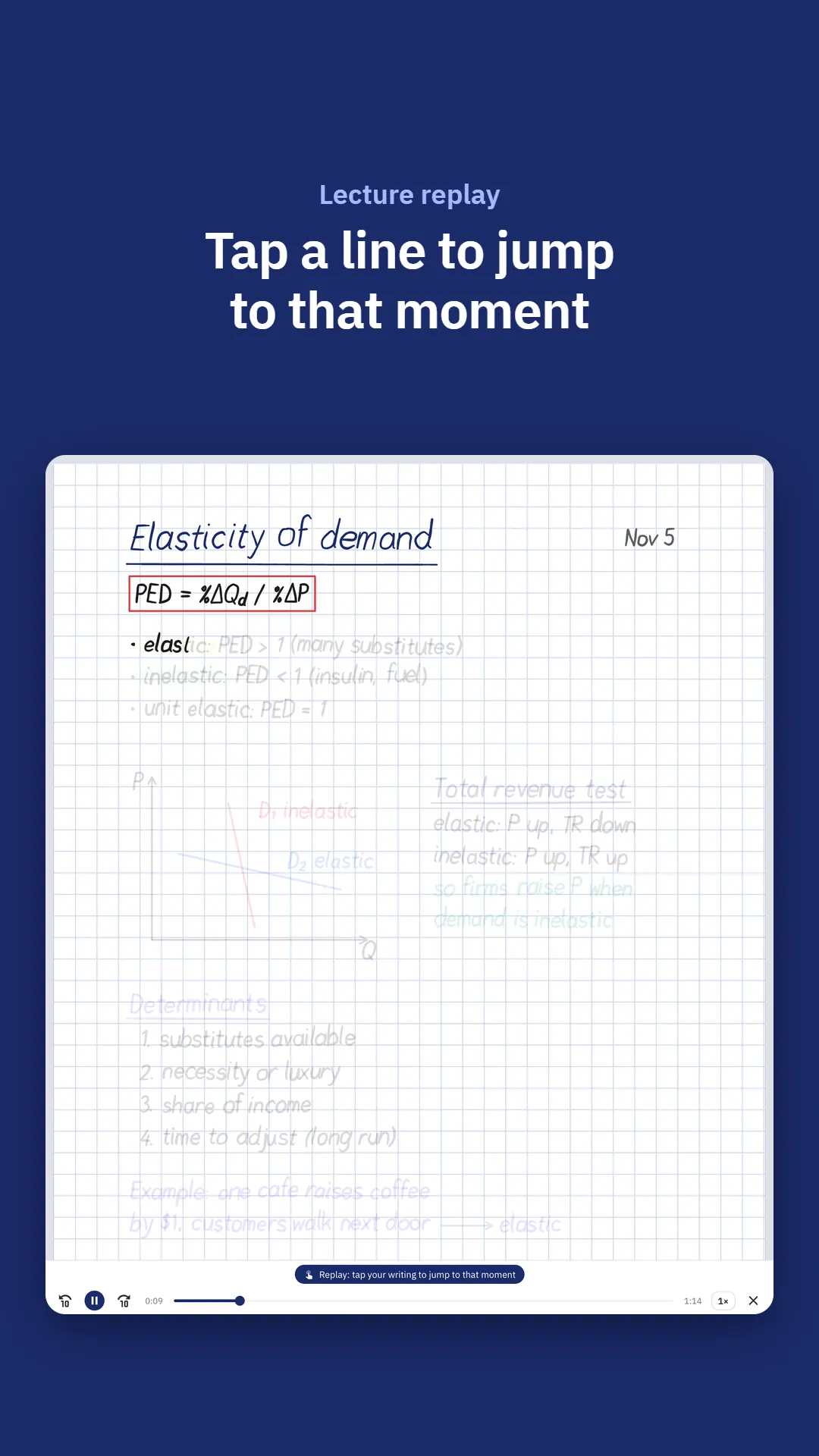
Press play and every line comes back at the moment you wrote it, or tap a line to jump the recording there. Pause for a break and carry on in the same recording.

The note replaying in Inksound: the formula, the kinds of elasticity and the graph already in ink, the rest still faint, and the replay bar at the bottom

Hold the pen, and it snaps into shape

Draw a line, a circle, a parabola or an arrow and keep the pen still: it becomes an exact shape you can still edit. Write √, ∫ or ≠ and hold, and it becomes a clean symbol in your pen's color.

Notes on projectile motion in Inksound: a parabola, an arrow and an ellipse drawn by hand and made exact by holding, labeled v0 and h max

Circle your writing to move it or tidy it

Circle writing to move, resize, rotate, recolor or copy it, even onto another page. Tidy up levels a hurried paragraph in one tap, and it stays your own hand.

Notes on forces and friction in Inksound: a worked example circled with the lasso, above a yellow page headed Worked examples

Circle a problem and ask about it

Where it is offered, Ask AI explains what you circled right in Inksound, ready to copy or to put on the page as text.

Answer here is not offered in the European Economic Area, Switzerland or the United Kingdom; there, Ask AI sends the picture to the AI app you use.

Ask AI in Inksound: a circled quadratic equation and, under it, the answer explaining step by step how to solve it, with Copy and Insert as text

Hebrew and English, built in

The whole app in Hebrew or English, laid out right to left in Hebrew. Typed text finds its own direction, so both languages share a note.

The library of Inksound in Hebrew, laid out from right to left: the subjects in the sidebar on the right and the cards of the notes

The night before the exam

Go over your notes, and wherever you're stuck, tap the line and hear the explanation again, exactly as it was given.

A student studies late by a desk lamp, writing on a tablet with a stylus beside an open book, a mug and a stack of books

Inksound in short

  • 5 notes free.
  • 103 ready-made drawings.
  • 9 kinds of paper.
  • No ads.

Everything else in your notebook

  • Write together in a shared note

    Share a note with the people you invite, and each of you sees the others' handwriting as it is written. Sharing a note is part of Pro; joining one is free and needs only an Inksound account.

  • Write on slides and photos of the board

    Import lecture slides, worksheets and past exams as PDF and write on them. Add a photo of the board, then crop and straighten it.

  • 103 ready-made drawings

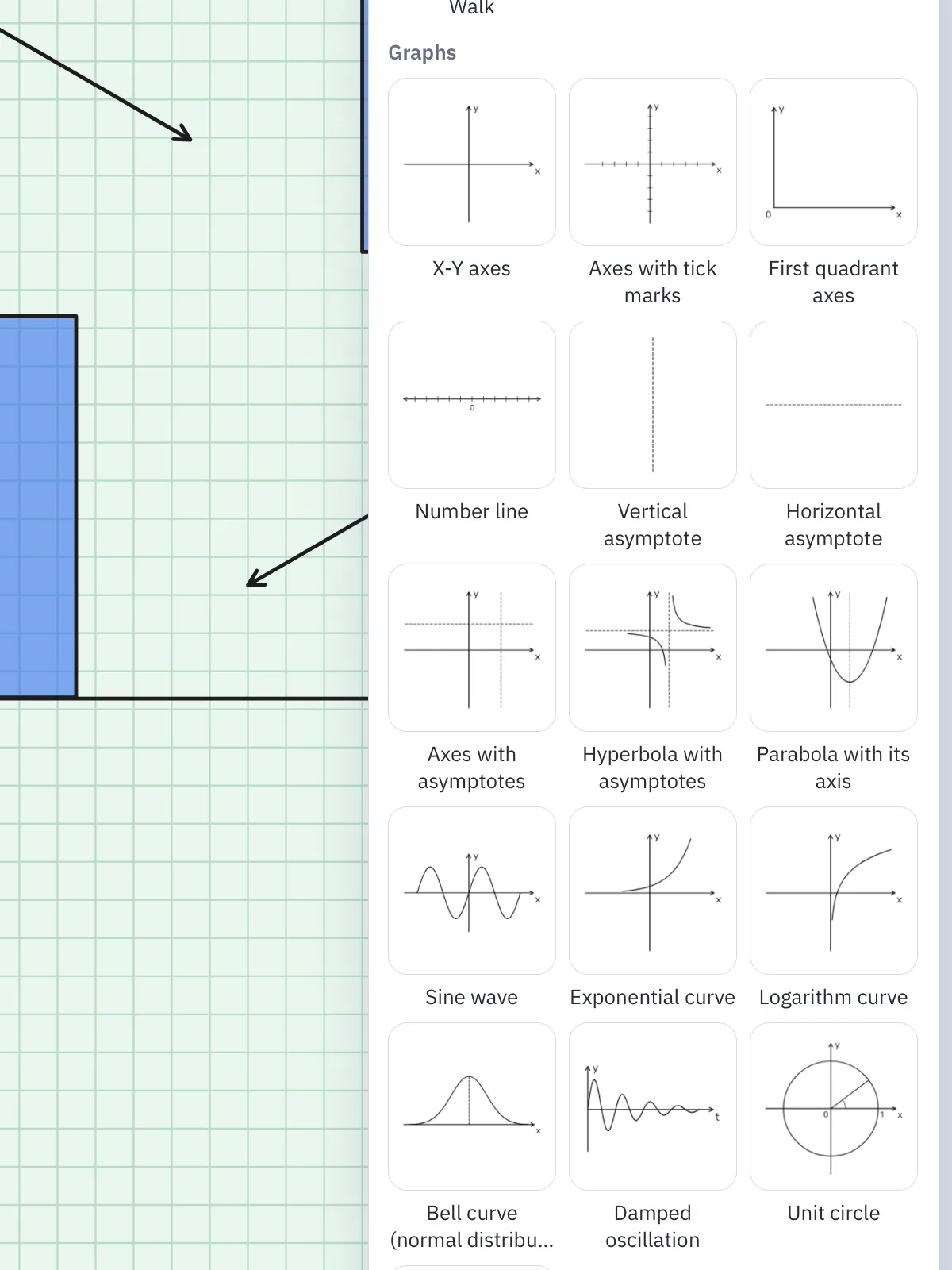
    Axes, graphs, the unit circle, beams, springs and circuits, plus sets for every field of study, placed in your pen's color as one group.

  • Paper for every subject

    Engineering, millimeter, grid, isometric, dotted, lined and Cornell paper, on A4, Letter, A5 or A3.

  • Math symbols

    Roots, integrals, sums and Greek letters from the palette, as clean text in your pen's color.

  • Feels like paper

    A pressure-sensitive pen, a highlighter and an eraser for part of a stroke. When you write with Apple Pencil or a stylus, your palm can rest on the screen.

  • Clean page breaks in PDFs

    Before you export, Inksound finds a line written across a page break and can move it whole to one page.

  • Bring your notes along

    Import a whole library of .note files: folders become subjects, and recordings still replay. Or bring notebooks as PDF.

  • Organize, share and back up

    Subjects, search, PDF export, one backup file of your library, and automatic backups to your own Google Drive. Deleted notes wait in Recently deleted for 30 days.

  • Help as you type

    Ask Help a question in English or Hebrew, and the answers come up as you type.

See every feature
Write right on your slides. Import a PDF and mark it up. Saved items in Inksound on iPad: ready-made graphs such as X-Y axes, asymptotes, a parabola, a sine wave, exponential and logarithm curves, a bell curve and the unit circle

Made for what you study

One notebook for every course, with the tools each kind of class needs.

  • Engineering and science

    Engineering paper, shapes by holding, a ruler with exact angles, and ready beams, springs and circuits.

  • Math

    Clean √, ∫ and ∑ from the palette, and ready graphs, axes and the unit circle.

  • Medicine and biology

    Write on the slides, label photos of diagrams, and hear again how it was explained.

  • Law and humanities

    Mark up readings as PDF, take notes on Cornell paper, and type in English or Hebrew.

  • Art and design

    A pressure-sensitive pen, your own colors, an eyedropper, and photos to crop and filter.

  • Languages

    Tap a word you wrote and hear exactly how it was said.

  • Music

    Write on scores imported as PDF, and replay the moment you marked.

  • High school

    5 free notes, straightened photos of the board, and PDFs for classmates.

Choose your field of study, and Inksound sets its paper, pens and ready-made drawings to fit.

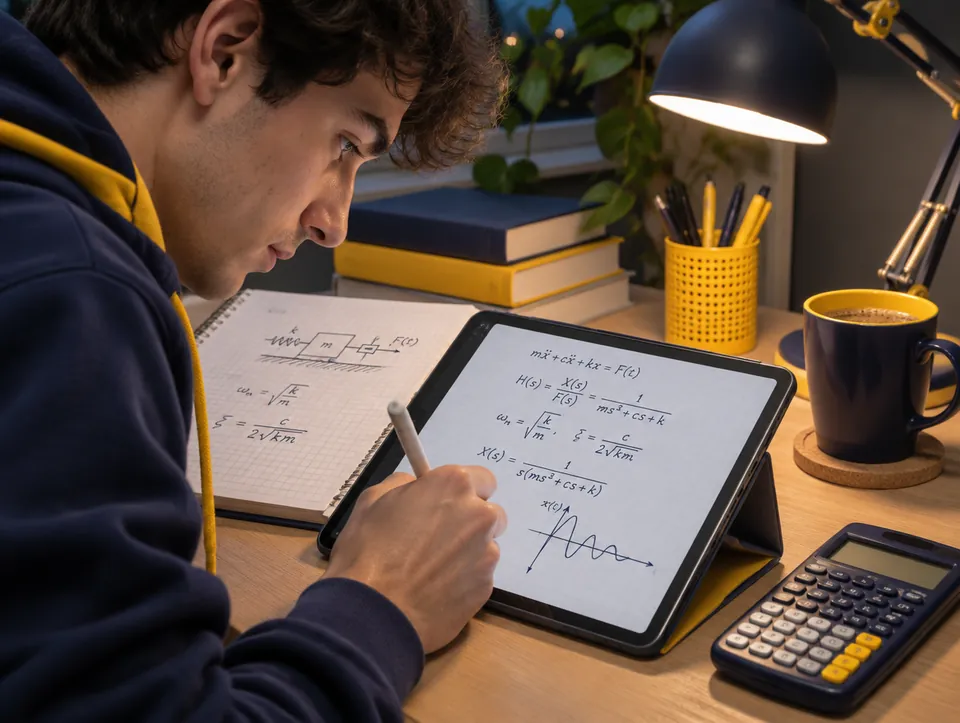
An engineering student at his desk in the evening writes the equations of a mass on a spring with a damper by hand on a tablet, beside a notebook and a calculator
A medical student in scrubs labels a drawing of the heart on a tablet with a stylus, in a library
An art student draws a portrait in color on a tablet with a stylus, among sketchbooks and paints in a sunny studio

Sync and study tools

  • iCloud sync between iPad and iPhone

    The same notes, subjects and saved items on both, through your own iCloud: turn on Sync with iCloud in Settings. On iPhone and iPad only, with iOS or iPadOS 17 or later.

  • Page bookmarks

    Bookmark the pages you come back to with the ribbon at their corner, and jump straight to them.

  • A study timer

    Time a study session with a stopwatch, or practice an exam with a countdown.

  • Presentation mode

    Show a note full screen, one page at a time, and point with a laser that fades by itself.

  • Page templates

    Ready-made pages for a to-do list, a daily or weekly planner, a lab report, lecture or meeting notes and a music staff, and templates of your own made from any page.

  • Personalization by field of study

    Choose your field, from engineering and science to music and high school: new notes get the paper that suits it, your pen favorites fit it, and its ready-made drawings come first.

Start free, and try Pro free for 7 days

Your first 5 notes are free with every tool, imported ones included. Inksound Pro removes the limit and lets you share notes.

  • Free

    $0 5 notes

    Every tool, for up to 5 notes, imported ones included

  • Monthly

    $2.99 a month

    7-day free trial

    Free for 7 days, then $2.99 per month

  • Yearly

    $19.99 a year

    7-day free trial

    Free for 7 days, then $19.99 per year

  • Lifetime

    $35.99 once

    7-day free trial on Android

    On Android: free for 7 days with nothing charged, then buy it once to keep Pro

US prices. Your country's price shows in the App Store or Google Play before you buy. Subscriptions renew automatically until you cancel them. Each free trial is offered once: one for Monthly and Yearly together, and, on Android, one for Lifetime.

Plans and free trials in detail

Your privacy

Your notes are kept on your device, and in your own iCloud if you turn on iCloud sync. We do not upload them to our servers, with two exceptions that you choose: a note you share with other people or join, which Inksound's server keeps while it is shared and for 30 days after sharing stops (never its audio recordings: they stay on your device), and a picture of a selection you send with Ask AI's Answer here. Backups to Google Drive go straight from your device to your own Drive, never through our servers. An Inksound account is optional and only for shared notes, and the app has no ads and no third-party analytics.

Read the Privacy Policy and the Terms of Use, or see how to delete your data.

Questions

What does Inksound do?

Inksound is a note-taking app built for the pen. You write by hand while it records the lecture, and later a tap on your writing plays what was said at that moment. You can also write on PDFs and photos, snap shapes and math symbols into place, and use it in English or Hebrew.

Which devices does it run on?

iPad and iPhone, from the App Store, and Android phones and tablets, from Google Play. Write with Apple Pencil on iPad, or with a stylus or your finger.

Is it free?

Your first 5 notes are free with every tool, imported ones included. Inksound Pro removes the limit and lets you share notes, for $2.99 a month, $19.99 a year or $35.99 once (US prices), and if you are new to Pro, you can try it free for 7 days. See Pricing.

What happens when I reach 5 notes?

Nothing is lost: your notes stay yours to open, edit and export. Pro is needed for new, imported or duplicated notes past the 5, and to share a note.

Do I need an account?

Only for shared notes. Signing in is optional: everything else works without it. To share a note or join one, sign in with Apple (on iPhone and iPad) or with Google, in Settings, under Account, where Delete account removes it at any time. Signing in sends no notes: notes reach Inksound's server only when you share them, or write in a note shared with you. Backups to your own Google Drive are separate from the Inksound account: connect Google Drive in Settings, under Backup.

Can I bring my notes from another app?

Yes. Import a whole library of .note files from a backup folder or a zip of it: folders become subjects, handwriting stays editable, and recordings still replay with your writing. From other apps, export your notebooks as PDF and keep writing on every page. One Import button takes PDFs, pictures and notes, several at once.

How do I move my notes to a new iPad or phone?

Make one backup file of your whole library in Settings, then restore it on the new device: two steps, and notes that are already there are never added twice.

Can I get back a note I deleted?

Yes, for 30 days. A deleted note waits in Recently deleted with its recordings, and Restore puts it back; after 30 days it is deleted for good. To delete it for good sooner, choose Delete now there (with iCloud sync on, on each device).

Does it sync between iPad and iPhone?

Yes, on iPad and iPhone with iPadOS or iOS 17 or later. Turn on Sync with iCloud in Settings on both, with the same Apple Account, and your notes, subjects and saved items, with their pictures, PDFs and recordings, stay the same on both, through your own iCloud. Sync is in every plan, the free one too, and it is off until you turn it on. A shared note stays out of iCloud sync: to have it on your other device, sign in there with the same Inksound account and open it from Shared notes in the library. Android has no sync: to or from an Android device, one backup file copies all your notes.

What does Ask AI send, and to whom?

Sent to an AI app, the picture of your selection goes only to the app you choose, and Inksound itself sends nothing. With Answer here, the picture and your question go through Inksound's server to an AI service for the answer, and we do not keep them unless you report an answer.

Answer here is not offered in the European Economic Area, Switzerland or the United Kingdom. Do not send personal information; the privacy policy has the details.

Does Inksound work in Hebrew?

Yes. The whole interface is in Hebrew or English, laid out right to left in Hebrew, and typed text flows right to left or left to right on its own.

How do I cancel a subscription?

In your App Store or Google Play account settings, at least 24 hours before the end of the current period. Deleting the app does not cancel it.

Who makes Inksound?

Ruby A&A Ventures LLC. Write to us through the support page, and tell us which device you use.

Start free with 5 notes.

Every tool included, on iPad, iPhone or Android. New to Pro? Try it free for 7 days.

Write to us through the support page and tell us which device you use (iPhone, iPad or Android). To ask us to delete your data, put Delete my data at the start of your message.

Inksound is made by Ruby A&A Ventures LLC.